RC812 Payslip Report
This aPay report can be run as part of the Disbursement Chain or as a stand-alone report from the menus. The report can be run in non-update or update.
This report produces payslips for all employees in the disbursement run. If multiple payruns have been disbursed together, one payslip is produced per employee.
Leave balances can be displayed on the payslip using pre-calculated balances or calculating the accrual at the time of processing. The leave types and the format of the leave balances are controlled by a CON_DEF and Kinds e.g. CON_DEF SH_PRO_RATA controls the display of the columns on RC812 when set to STD:
7. will display the Actual and Pro-rata balances
8. will display only the Actual balances
9. will display the Actual, Pro-rata (i.e. pro-rata minus actual) and the Total (pro-rata) balances
For AUST employees, the subsidy section includes Fund Id information to support with Choice of Super.
Where a FUND_ID exists for a superannuation subsidy amount in the pehistpay table then the superannuation Paycode and the Fund Id will be displayed in the Super Code column. The Super Fund column will report differently where a Fund Id exists for the payment:
If the Fund Id is populated in the pehistpay table, then RC812 will check if an External Body code is set up in the FA039 Super Fund Product Maintenance form for the Fund Id. If so, then the External Body name for the external body code associated with the Fund will be reported. If no External Body code is entered in FA039 Super Fund Product Maintenance form for the Fund Id, then the External Body name for the external body code associated with the Paycode will display. If no external body code is associated with Fund or the Paycode then the column will be null/blank.
If the Fund Id is not populated in the pehistpay table, then the External Body name of the External Body code attached to the Paycode will be inserted into the column. If no external body code is associated with the paycode then the column will be null/blank.
The above applies to both the STD and VAR layouts of the RC812 Payslip Report (Con_Def RC812_LAYOUT).
When set to ‘Y’. Con_Def RC812_SGC_DETAILS allows additional SGC information to be displayed on this payslip, including the Fund Id where applicable.
Please note, however, that this may not in itself fulfil the legislative requirements for SGC reporting. It is strongly recommended that clients seek ATO advice to ensure that they adhere to this legislation.
1) The (RC812_LAYOUT) STD layout is hardcoded to have max 11 for salary, allowances and overtime (SAO) in the RC812PDF code.
2) The (RC812_LAYOUT) VAR layout is looking at CON_DEF > RC812_MAX_SAO config in the RC812PDF code.
Also, when VAR layout is selected, user has no choice of leave types or leave balance formats displayed.
VAR covers 3 leave types only - A, L & S.
A => it is hardcoded with Annual : as description
L => it is hardcoded with Long Service : as description
S => it is hardcoded with Sick : as description
VAR is not using SH_PRO_RATA config. VAR only uses balance_actual_full column from lv_accrual to display output.
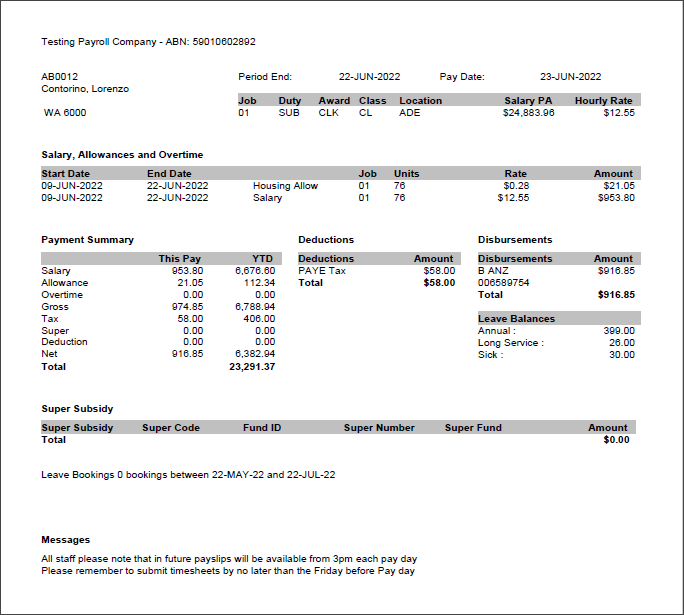
Variable
This layout is based on the layout from RC812 when the CON_DEF RC812_LAYOUT is set to VAR.
There is some conditional formatting including:
· In RC812 there are two subsidy sections defined on the layout. One shows the description and the amounts, the other shows super fund details also. The section will be displayed depending on the value of the RC812_SGC_DETAILS CON_DEF. If it is Y then the more detailed section will display, otherwise the simpler section. The two sections have been created but by default only one will be added to the layout depending on this CON_DEF. It can be changed in the layout setup in Express as required. The CON_DEF will not be referenced by the new layout.
· CON_DEF RC812_MAX_OCC is referenced to set the number of job records to display. It can be changed in the layout setup in Express as required. The CON_DEF will not be referenced by the new layout.
· CON_DEF RC812_MAX_SAO is referenced to set the number of Salary, Allowance and Overtime records to display. It can be changed in the layout setup in Express as required. The CON_DEF will not be referenced by the new layout.
· CON_DEF RC812_MAX_LVA used to set the number of leave accrual records to display. It can be changed in the layout setup in Express as required. The CON_DEF will not be referenced by the new layout.
· In RD651, leave balances display can be displayed/hidden via the payslip layout configuration in Express. By default, this section will display.
· CON_DEF RC812_SICK_LV_DISPLAY is referenced to determine if sick leave should be included in leave balances. This has been replaced by new CON_DEF PSLIP_SICK_LV_DISPLAY.
Standard
This layout is based on the layout from RC812 when the CON_DEF RC812_LAYOUT is set to STD.
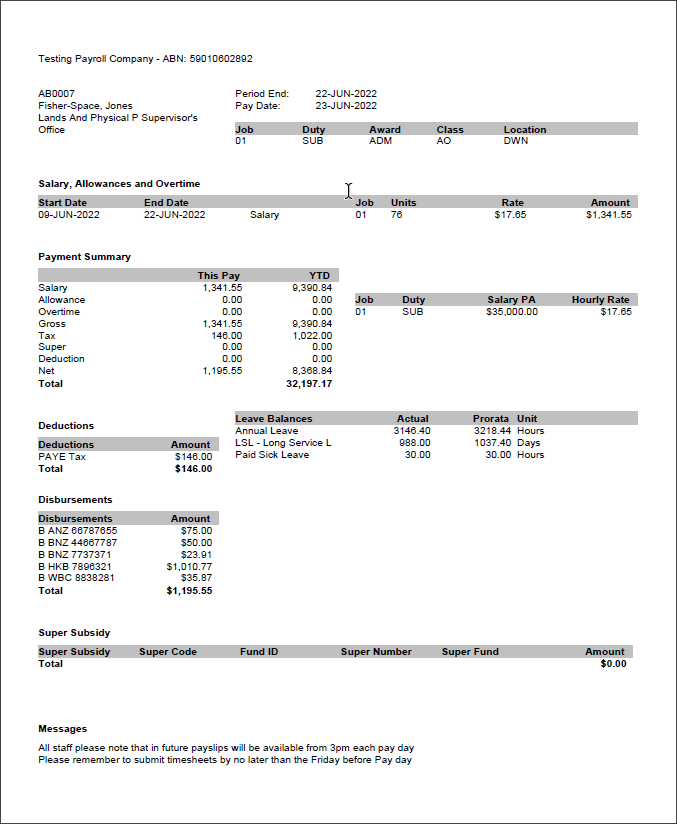
There is some conditional formatting including:
In RC812 there are two subsidy sections defined on the layout. One shows the description and the amounts, the other shows super fund details too. The section will be displayed depending on the value of the RC812_SGC_DETAILS CON_DEF. If it is Y then the more detailed section will display, otherwise the simpler section. The two sections have been created but by default only one will be added to the layout depending on this CON_DEF. It can be changed in the layout setup in Express as required. The CON_DEF will not be referenced by the new layout.
· CON_DEF RC812_MAX_OCC is referenced to set number of job records to display in both job sections. It can be changed in the layout setup in Express as required. The CON_DEF will not be referenced by the new layout.
· In RD651, leave balances can be displayed/hidden via the payslip layout configuration in Express. By default, this section will display.
· CON_DEF RC812_SICK_LV_DISPLAY is referenced to determine if sick leave should be included in leave balances. This has been replaced by the new CON_DEF PSLIP_SICK_LV_DISPLAY.
There are four possible leave balances sections that can display depending on different criteria:
1. Dynamic Leave balances - this will display if records exist in the code kind PAYSLIP_LV_CODE. This section will also optionally display the actual, prorata and total amounts depending on the SH_PRO_RATA CON_DEF setting. Prorata will only display if it is 1 or 3 and total will only display if it is 3. Actual will always display.
2. Dynamic Leave balances NZ - For NZ employees only, the balance in weeks column will also display, if the SH_PRO_RATA flag is set to Y then this will be the pro-rata balance in weeks, otherwise it will be the actual balance in weeks.
3. If it is not using dynamic leave then it will display Annual Leave, LSL and Sick Leave as three separate records.
4. For NZ if it is not using dynamic then the actual balance in weeks will also display.
Please note:
· The functionality to specify the filename of the payslip file that is to be emailed to each employee is not enabled in the new dynamic payslips. This will be addressed in a future release.
· The old Oracle payslip reports RC812 and RC812PDF have been retained for legacy purposes but will not be maintained going forward.
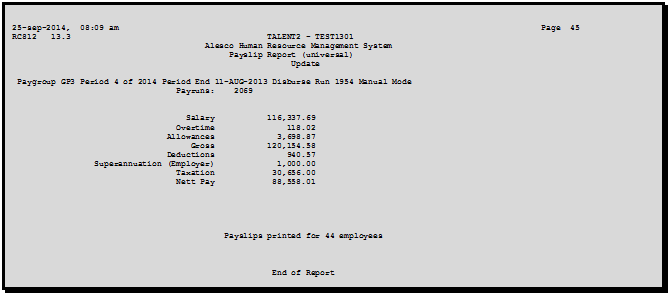
RC812 Payslip Report - Totals Summary
RC812PDF PDF Payslip (Universal) - Mobile
This aPay report can be run as part of the Disbursement Chain or as a stand-alone report from menus 0631 or 0684, and must be run in conjunction with RG937 - Multi File LOB Processing (RD650 - Process Payslips must have been run in the disbursement chain prior to running RC812PDF and RG937 whether run in disbursement or standalone). The report can be run in non-update or update.
This report produces PDF payslips for all employees in the disbursement run for the Mobile Application. For full set-up requirements to be able to process PDF payslips for the mobile application, please refer to the Mobile Application Administration User Guide.
The same guidelines apply to RC812PDF as those for RC812 (e.g. multiple payruns disbursed together, CON_DEFs and Kinds for leave balances, Super and layout, and Choice of Super).
This report allows selection and processing of multiple Disbursement Ids for the same Pay Group and same Period End Date. If employees have been paid under more than one Disbursement run for a pay period, RC812PDF can now be run across all those disbursements and the employee will have a multi-page payslip detailing pay information for each of the disbursements for the period. Select Disbursement Run numbers one after the other or enter the Disbursement Run numbers in comma delimited format as follows:

RC812PDF does not have a ‘totals’ page as these payslips will have been split into individual employee files.
The following is based on the STD layout with Con_Def SH_PRO_RATA set to 3.
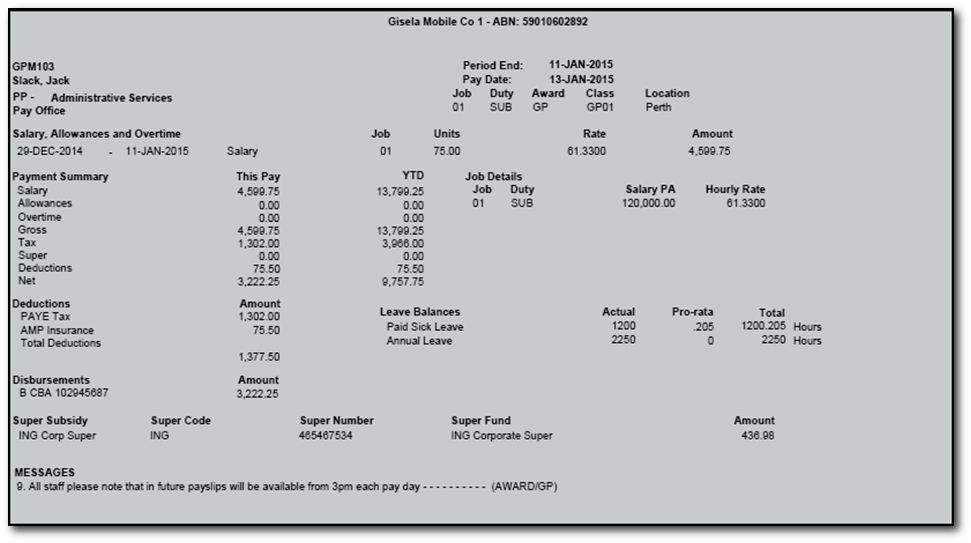
This aPay report can be run as part of the Disbursement Chain or as a stand-alone report from menus 0631 or 0684, and must be run in conjunction with RG937 - Multi File LOB Processing (RD650 - Process Payslips must have been run in the disbursement chain prior to running RC812PDF and RG937 whether run in disbursement or standalone). The report can be run in non-update or update.
This report produces PDF payslips for all employees in the disbursement run for the Mobile Application. For full set-up requirements to be able to process PDF payslips for the mobile application, please refer to the Mobile Application Administration User Guide.
The same guidelines apply to RC812PDF as those for RC812 (e.g. multiple payruns disbursed together, CON_DEFs and Kinds for leave balances, Super and layout, and Choice of Super).
RC812PDF does not have a ‘totals’ page as these payslips will have been split into individual employee files.
RC812PDF PDF Payslip (Universal) - Emailing
This aPay report is launched from menu 0631 Process Pay using the RC812PDF PDF Payslip (Universal) report chain.
This report produces PDF payslips for all employees within a disbursement run and emails the payslip to employee email addresses.
The same guidelines apply to RC812PDF as those for RC812 (e.g. multiple payruns disbursed together, CON_DEFs and Kinds for leave balances, Super and layout, and Choice of Super). There are also specific configuration options for emailing the PDF payslips, for full set-up requirements to process PDF payslips for emailing please refer to the Payroll Management Volume 1 User Guide.
This report allows selection and processing of multiple Disbursement Ids for the same Pay Group and same Period End Date. If employees have been paid under more than one Disbursement run for a pay period, RC812PDF can now be run across all those disbursements and the employee will have a multi-page payslip detailing pay information for each of the disbursements for the period. Select Disbursement Run numbers one after the other or enter the Disbursement Run numbers in comma delimited format as follows:
The following is based on the STD layout with Con_Def SH_PRO_RATA set to 3.